How to scrape e-commerce sites with Claude: MCP and API setup
Connect DeepScout to Claude in two minutes and ask for a whole store's catalog in plain language. A real run on two UK coffee shops: the prompts, the prices, the time and the data you get.
Ask Claude to "get the prices from this store" and it will try. It fetches a page, reads it and gives you a table. That works for one product page. It doesn't work for a store: a catalog has hundreds or thousands of product pages, spread over categories and pagination, often rendered with JavaScript and often behind anti-bot protection. And every page Claude reads goes into its context window.
This guide shows a different setup. Claude talks to DeepScout through MCP. You ask in plain language, DeepScout scrapes the whole catalog in the background, and Claude gets clean product data back.
Setup takes two minutes. Then we run it on two shops that sell espresso machines in the UK, with the real prompts, prices and times.
The short answer
- Fetching pages in a chat doesn't scale to a store. It's fine for a few URLs, not for a catalog.
- With the DeepScout MCP server, Claude starts jobs instead of fetching pages. DeepScout finds every product, handles JavaScript and anti-bot protection, and returns structured data: prices, availability, brand, images and EAN where the store shows it.
- Setup is one command or one click. DeepScout is in Claude's connector directory, and it works in Claude Code, Cursor, Codex and VS Code too.
- You see data and the price before you pay. Every analysis comes with a free data sample and the exact price of a full scrape. Each project also gets one free matching sample.
- Our run: 4,168 products from two stores for €2.92 in scraping, and 38 shared products found by the free matching sample in 4 minutes.
Why not just let Claude fetch the pages?
A chat fetch reads one URL and puts the page into the conversation. For a store, three things get in the way:
- Finding the products. A catalog sits behind category pages, filters and pagination. Somebody has to find every product URL, and keep finding new ones.
- Getting the page. Many stores render prices with JavaScript, and many sit behind Cloudflare or similar protection. A plain fetch gets a challenge page or an empty shell. More in our Cloudflare guide.
- Reading it at scale. A product page is thousands of tokens of HTML. A few dozen pages fill the context window, and the next conversation starts from zero.
DeepScout does this part as a job. It analyzes the store once, learns where the data sits on its pages, then scrapes the whole catalog with the right method for that store. Claude only sees the result: a file with one row per product.
Set up DeepScout in your client
The server is hosted, so you install nothing. Your first sign-in with Google or GitHub creates your DeepScout account.
Claude (web and desktop)
DeepScout is in Claude's connector directory. Open Customize → Connectors → Discover, search for DeepScout and click Connect to Claude.
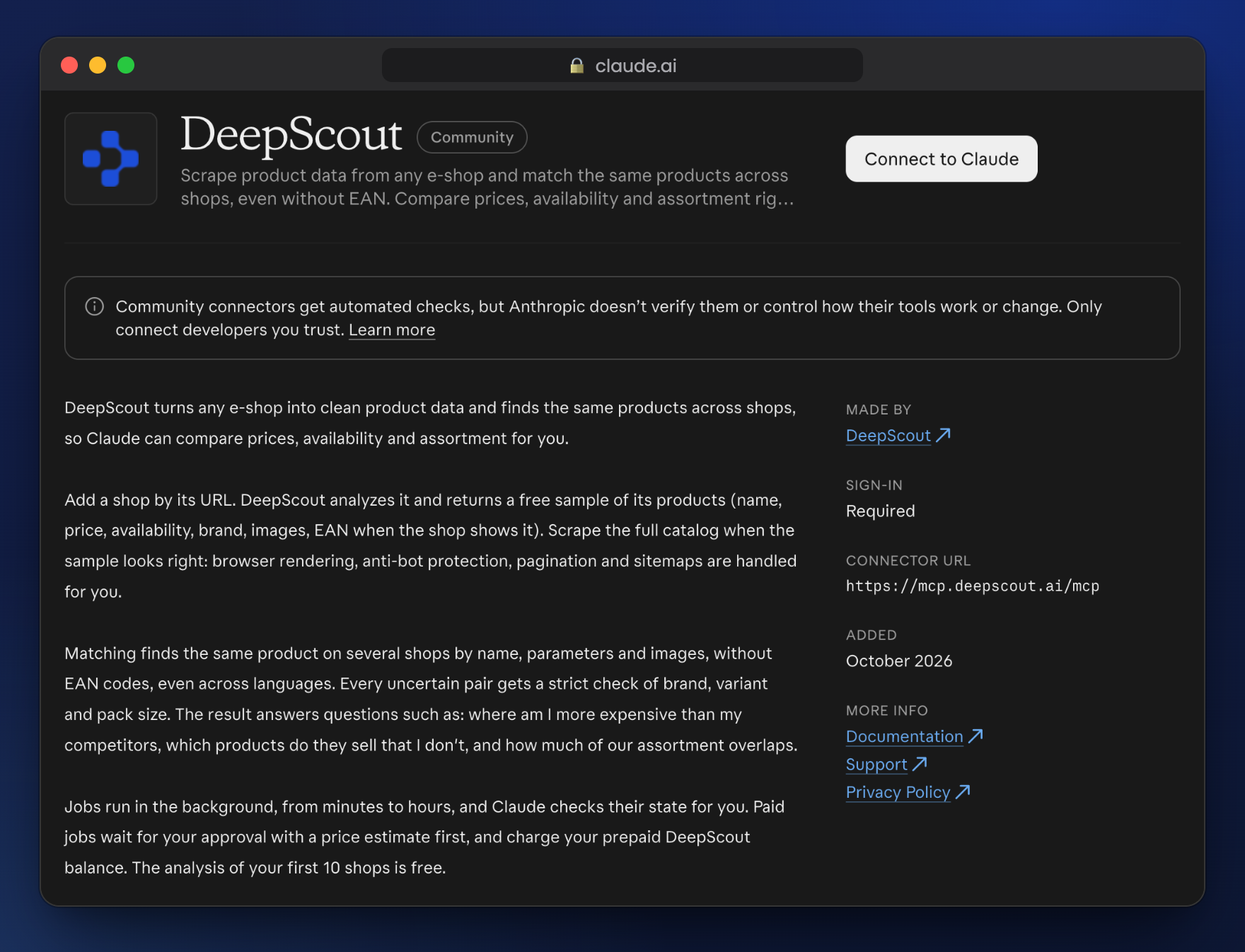
DeepScout in the Claude connector directory.
If your organization doesn't allow directory connectors, add it yourself: Customize → Connectors → Add → Add custom connector, name DeepScout, MCP server URL https://mcp.deepscout.ai/mcp, then Continue. In a Team or Enterprise organization, an owner adds the connector first. The first time Claude uses a DeepScout tool, it asks you to allow it.
Claude Code and Codex
Run the command below. Then, in Claude Code, start a session, run /mcp, select deepscout and Authenticate. In Codex, if the sign-in doesn't open, run codex mcp login deepscout.
$ claude mcp add --transport http deepscout https://mcp.deepscout.ai/mcpCursor
Add DeepScout to ~/.cursor/mcp.json, then open Cursor Settings → MCP and click Connect.
{"mcpServers": {"deepscout": { "url": "https://mcp.deepscout.ai/mcp" }}}
VS Code
Add DeepScout to .vscode/mcp.json in your project, then click Start above the server.
{"servers": {"deepscout": { "type": "http", "url": "https://mcp.deepscout.ai/mcp" }}}
You can see and disconnect connected apps in the console under Settings → API keys. Other clients: MCP docs.
A real run: two espresso machine shops
We picked two shops that sell espresso machines, grinders and accessories in the UK: Espresso Coffee Shop (about 1,000 products) and Coffee Friend (about 3,000, with coffee, tea and kitchen items besides the machines). The goal: both catalogs, and the products they both sell, with prices side by side. Everything below ran in Claude Code with the DeepScout MCP server; the times and prices are from our run.
1. Analyze both stores
"Create a new DeepScout project and analyze espressocoffeeshop.co.uk and coffeefriend.co.uk for the UK market, prices in GBP."
Claude creates the project and checks the balance. We had used our free analyses for the month, so it asked before it spent €0.50 per store.
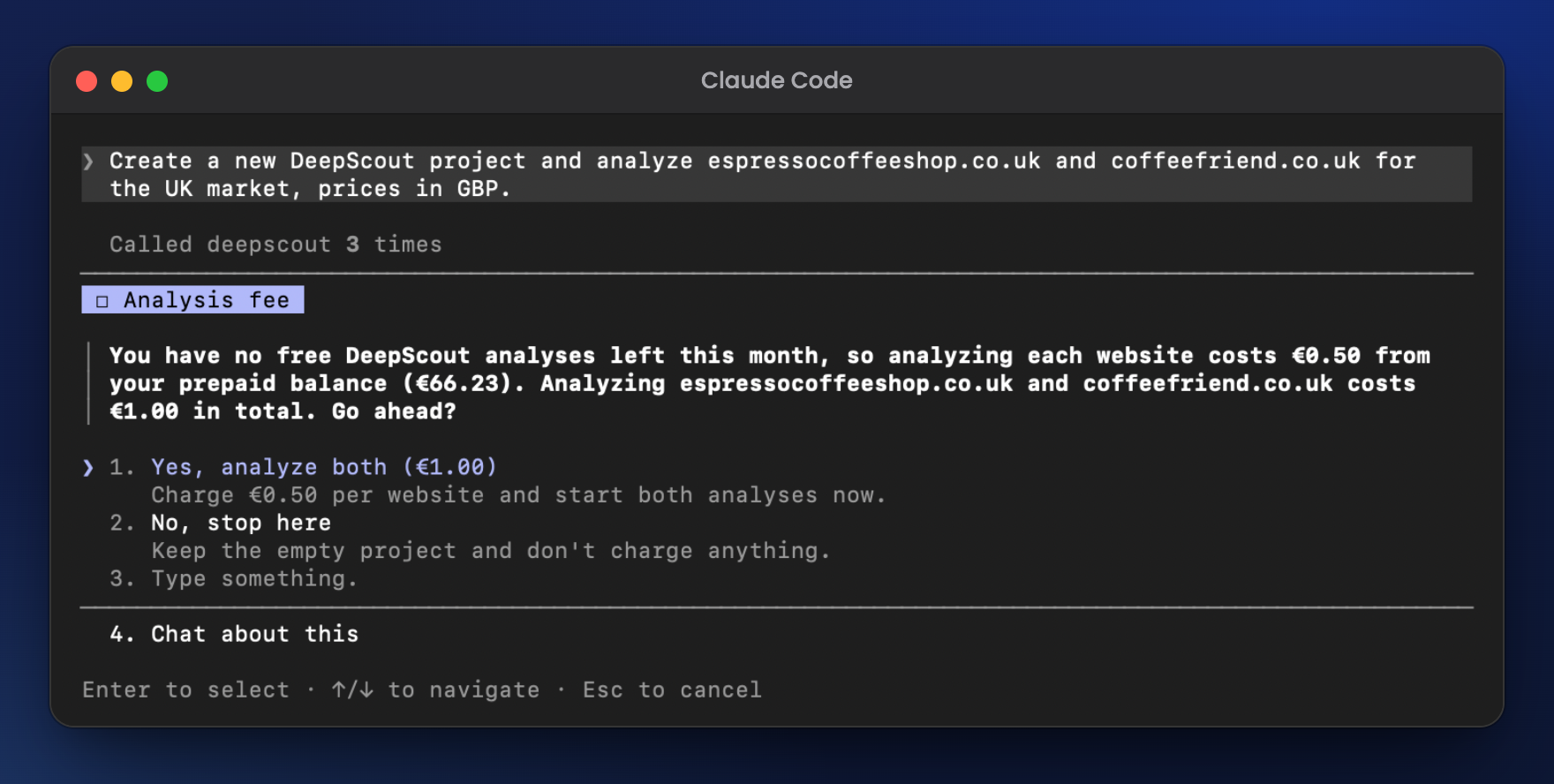
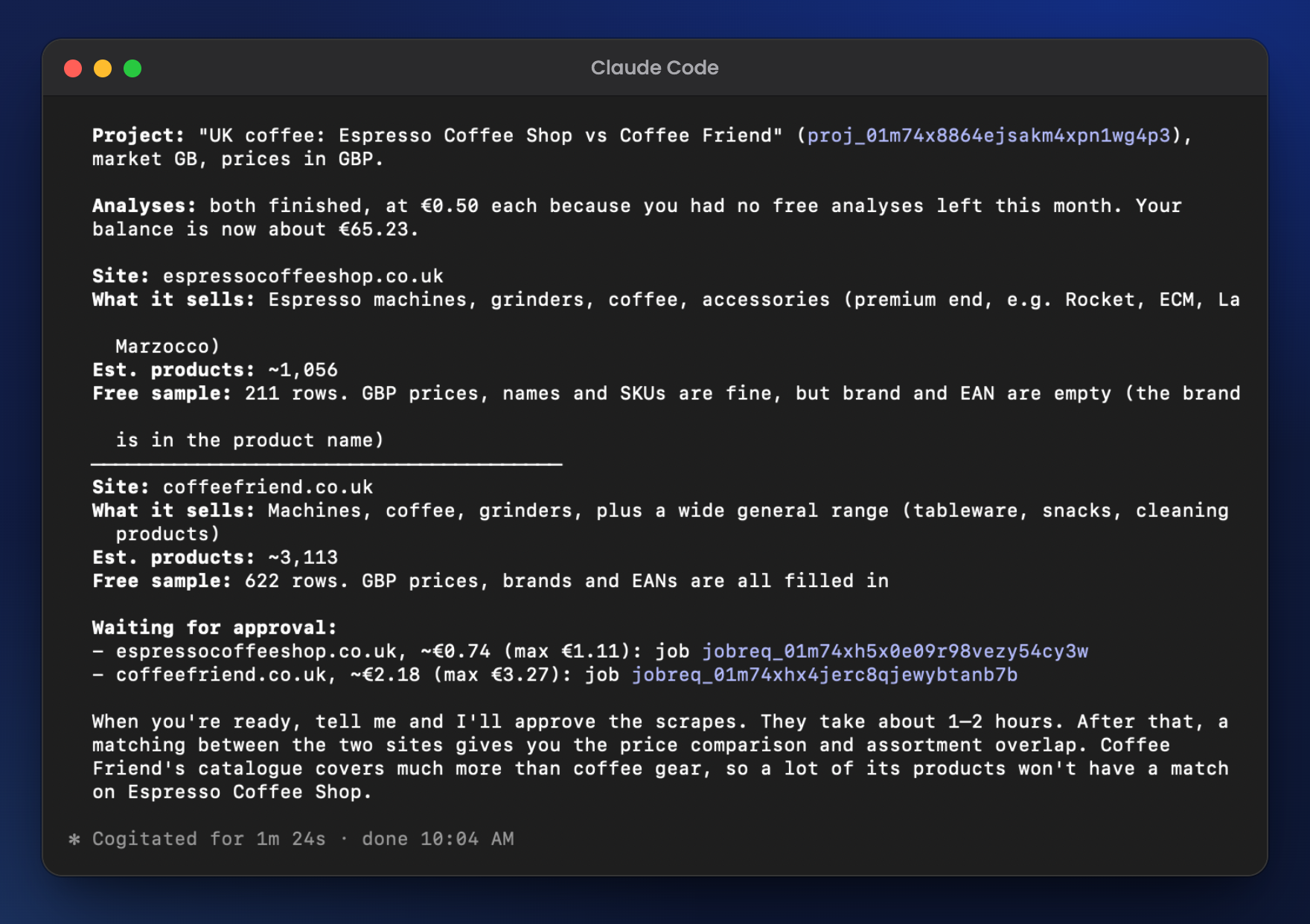
The analysis takes from a minute, for a store DeepScout already knows, to an hour or two for a new one, because then it also trains a scraper for the store. Claude then read both free samples and summed up: about 1,056 and 3,113 products, prices in GBP, and Espresso Coffee Shop shows no brand or EAN (the brand is in the name).
2. Check the free sample
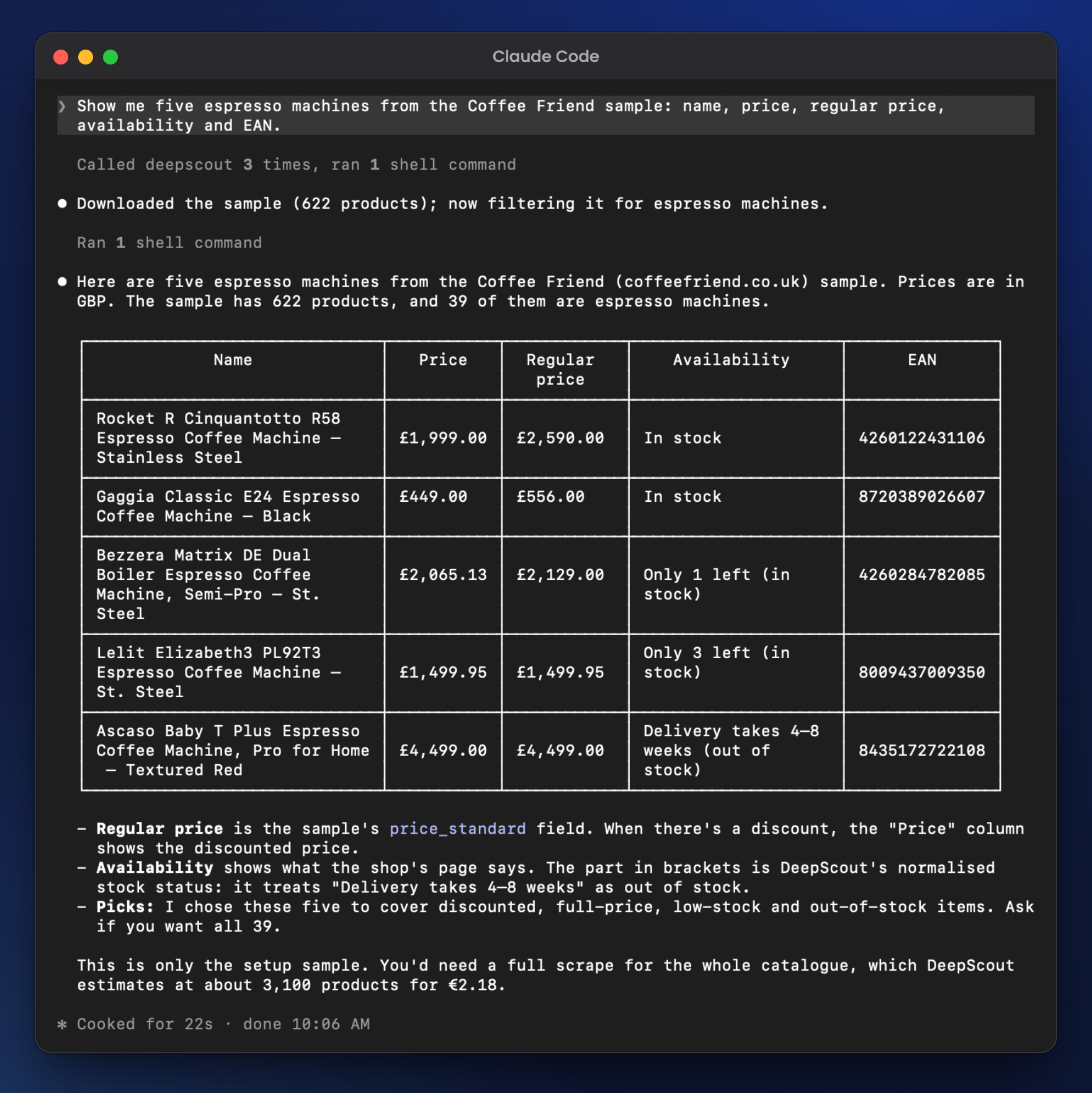
"Show me five espresso machines from the Coffee Friend sample: name, price, regular price, availability and EAN."
The sample had 622 real products from the store, 39 of them espresso machines. Claude explains the columns: the regular price is the price before a discount, and next to the store's own wording ("Delivery takes 4-8 weeks") is DeepScout's normalized stock status (out of stock).
3. Approve the full scrape
Claude creates a scrape job for each store. That costs nothing: the job waits with its price estimate until you approve it, and Claude asks first: €0.74 and €2.18, €2.92 together, and at most €4.38.
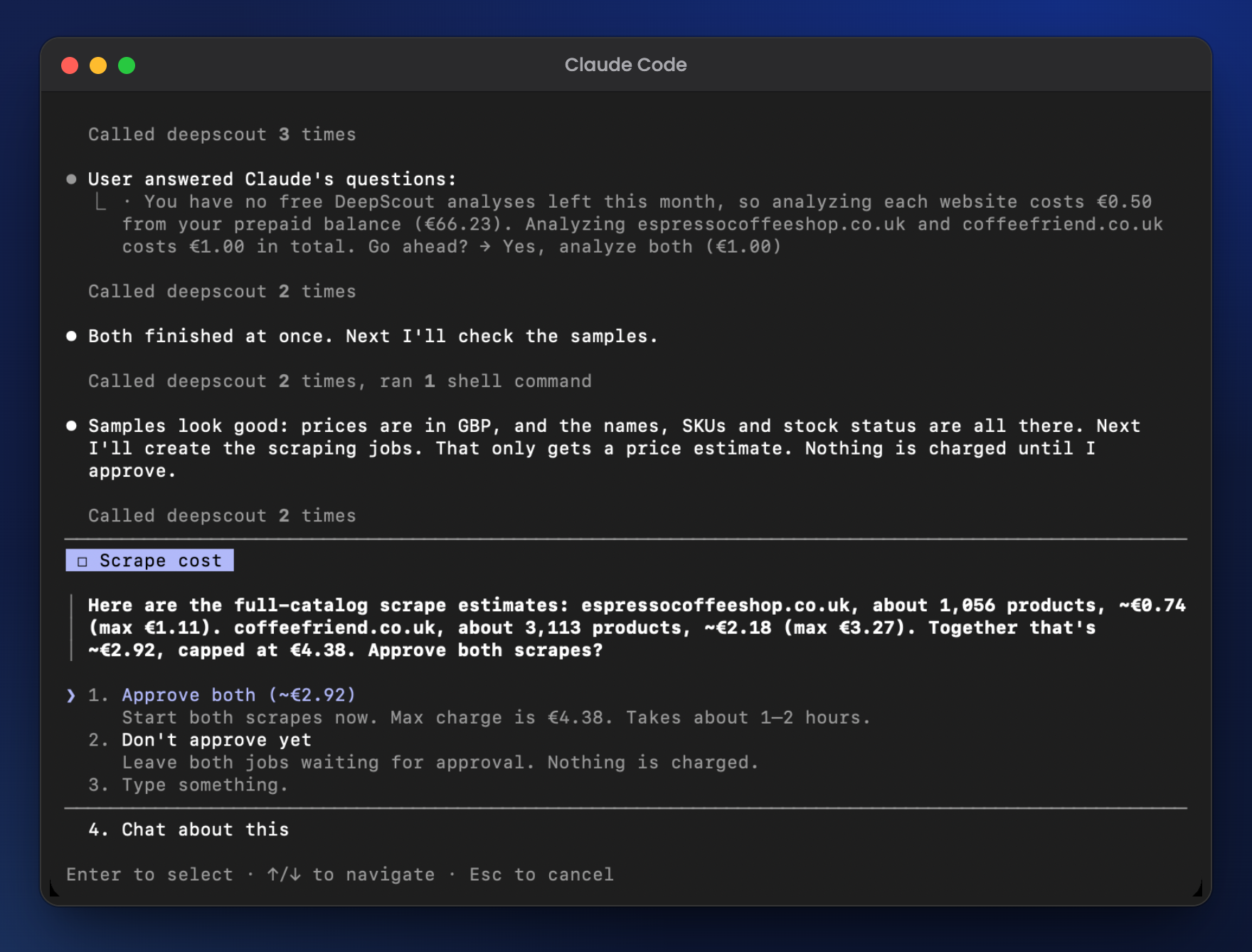
Espresso Coffee Shop finished in about 2 hours: 1,056 products, €0.74. Coffee Friend, which blocks plain requests and needs a real browser, took about 4.5 hours: 3,112 products, €2.18. The full crawl can find more products than the estimate, so the final charge can be higher, but never above the maximum shown at approval: 1.5× the estimate.
4. See what both stores sell
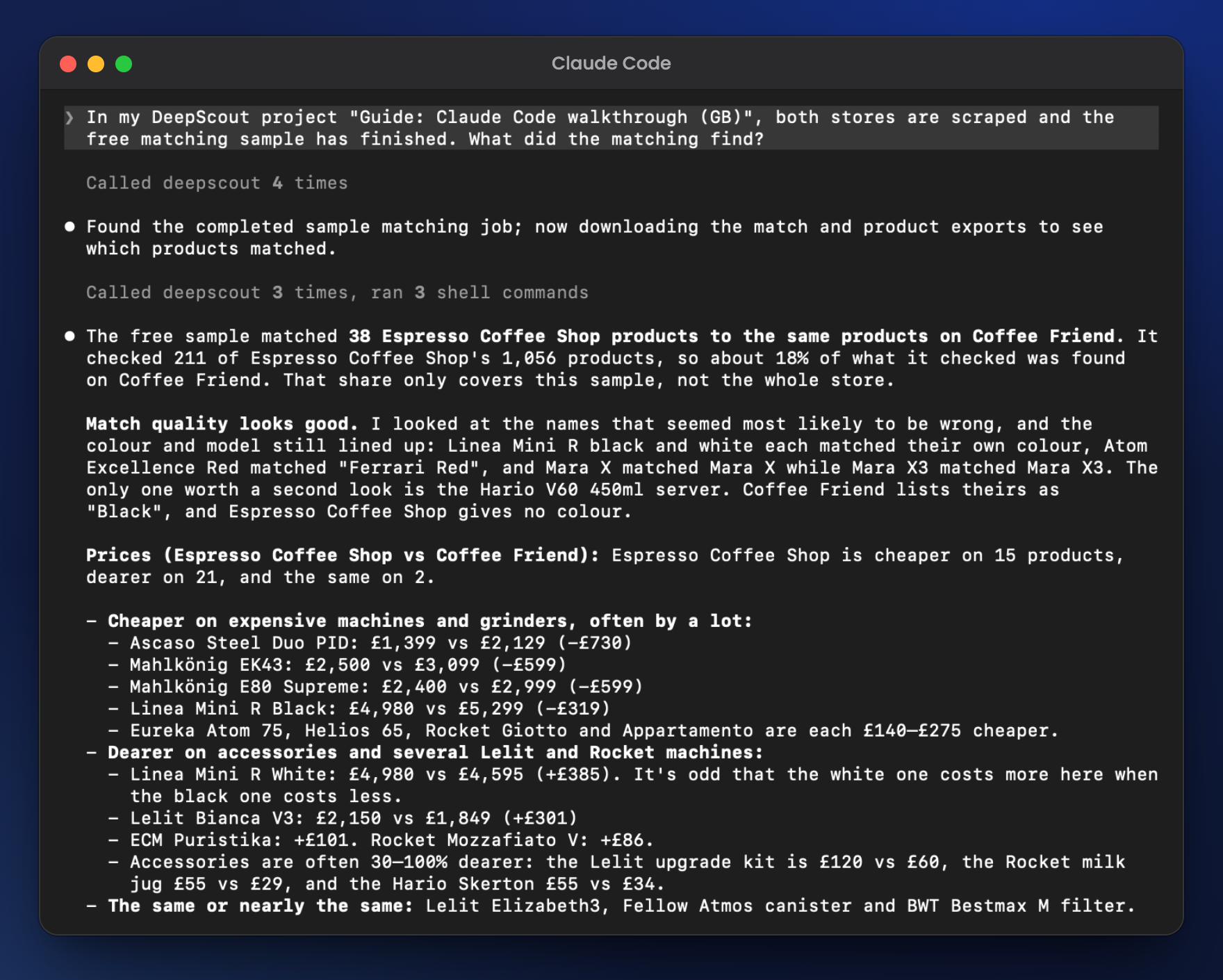
We ran the free matching sample (one per project): it takes 20% of the reference store, 211 products, and matches them against the whole competitor. It took 4 minutes and found 38 products that both stores sell. That also tells you whether two stores overlap enough before you pay for a full matching. Then we asked Claude:
"What did the matching find?"
It joined the matches with both exports, checked the doubtful pairs itself (the white and black Linea Mini R each matched their own color, Mara X matched Mara X and Mara X3 matched Mara X3), and compared prices: Espresso Coffee Shop was cheaper on 15, Coffee Friend on 21, and 2 cost the same.
Five products both stores sell
| Product | Espresso Coffee Shop | Coffee Friend |
|---|---|---|
| La Marzocco Linea Mini R, white | £4,980 | £4,595 |
| Lelit Bianca V3 PL162T | £2,150 | £1,849 |
| Rocket Giotto R Fast | £1,950 | £2,150 |
| Rocket Mozzafiato Timer / Cronometro V | £1,485 | £1,399 |
| Eureka Atom Excellence 75, red | £1,086.05 | £1,360 (out of stock) |
Prices incl. VAT, as shown on the two stores on 10 November 2026.
What to ask next
Once the stores are scraped, you keep asking in plain language. A few prompts to try on your own stores:
- "Which products does Coffee Friend sell that Espresso Coffee Shop doesn't?" Assortment gaps, from the matching.
- "Run the full matching and list every product where Espresso Coffee Shop is more than 10% more expensive." A full matching is a paid job, so Claude shows its price first.
- "Which of the shared products are out of stock at Coffee Friend?" Stock status comes with every product.
- "Add a third coffee shop to the project and compare prices across all three." A matching connects all the stores in a project.
- "Save the matched products with both prices as a CSV file." In Claude Code, the file lands in your project folder.
What the data looks like
One product from the Coffee Friend export. Every row has the same fields, whichever store it comes from.
price is what the store charges now, price_standard the regular price. Coffee Friend showed a regular price above the current one on 72% of its products.
{"name": "Lelit Bianca V3 PL162T Dual Boiler Espresso Coffee Machine – St. Steel","brand": "Lelit","price": 1849.0,"price_standard": 2199.95,"currency": "GBP","availability": "In stock","availability_extracted": "IN_STOCK","ean": "8009437005154","sku": ["8009437005154", "product-199011", "PL162T-UK"],"category_extracted": ["Coffee machines", "Commercial coffee machines", "Professional coffee machines for cafe"],"product_url": "https://www.coffeefriend.co.uk/p/coffee-machine-lelit-bianca-pl162t-eu-v3/","image_url": "https://img.kavosdraugas.lt/8bb9842c-4a18-4b8f-aaa2-4c95f3045f2a/1000x1000/pl162tupd1png.jpg"}
What it cost
| Step | Price | Our run |
|---|---|---|
| Analysis + data sample | 10 stores a month free, then €0.50 per store | €1.00 (we had used our free analyses that month) |
| Full scrape | €0.40 / €0.70 / €1.20 per 1,000 products, by how hard the store is | €0.74 + €2.18 = €2.92 |
| Matching sample | Free, one per project | €0 |
| Total | — | €3.92 |
You always see the price before a paid job starts, and Claude asks you to confirm it. Details in our pricing docs.
The same over the API
The MCP tools are the same steps as our REST API, so anything Claude does here, your code can do too: create a setup job for each store, wait until it's COMPLETED, create a scraping job, approve it, and download the export. Base URL https://api.deepscout.ai/v1. See the API docs.
Try it on your store
Create a project, paste the store URL and wait for the analysis. You see the free sample, the product count and the price before you pay.
Open the consoleScrape your first store
Connect DeepScout to Claude, or add a store in the console. The analysis and the data sample are free for 10 stores a month, so you see the data and the price before you pay anything.
Questions
Which AI clients work?
Any client that supports remote MCP servers. We document Claude, Claude Code, Cursor, Codex and VS Code; clients that only run local servers can use mcp-remote. See the MCP docs.
What if the store blocks scrapers?
DeepScout picks the method per store and handles anti-bot protection. Harder stores cost more per product, and you see that price before you start. More in our Cloudflare guide.
How long does it take?
The analysis takes from a minute to an hour or two for a store DeepScout doesn't know yet. A full scrape takes from under an hour to several hours: our 3,000-product store that needs a browser took 4.5 hours. Claude can check the job for you.
Do I need EAN codes to match products?
No. DeepScout matches by name, specifications and photos, also across languages. See product matching without EANs.
What does DeepScout see from my conversation?
Only the tool calls Claude makes and their inputs, such as the store URL or a job ID. An MCP server doesn't receive the conversation itself.
Read next
Get started with the API
Scrape any e-shop into clean product JSON, then match it against the shops you pick. No EAN or barcode required. Usage-based, from €0.40 per 1,000 products.